
Browse both sides of an Aspect pair
Filter the Anima list to an opposing pair such as Light and Dark, and see which Aspects have no opposite.
Select both sides from the Anima list
On the Anima list, a pair control selects both Aspects at once. Light / Dark shows Light and Dark together. Choosing that same pair again clears the filter. An individual Aspect chip is a different control: it does not add the opposite for you.
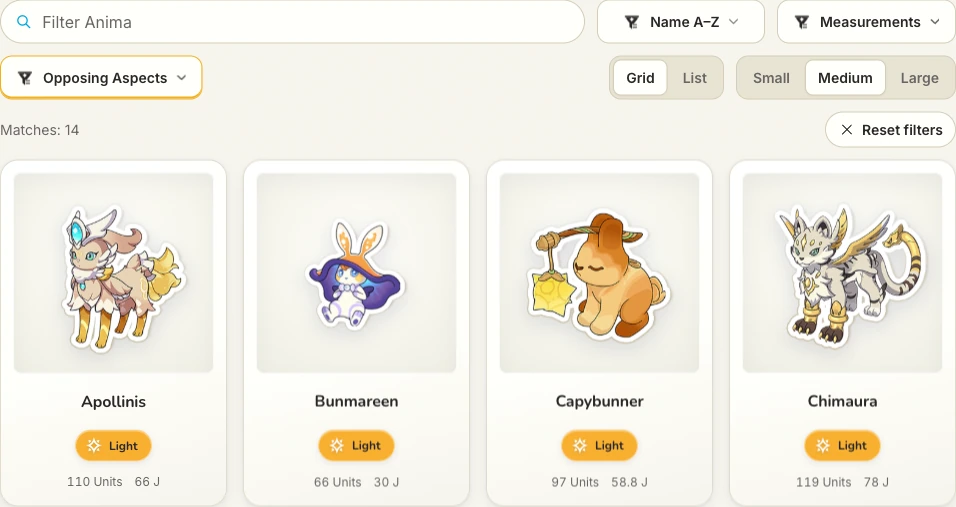
The Dark and Light filter keeps both sides in the result list.
Open these resultsSee the pairs on the Aspect index
the Aspect index shows these opposing pairs: Beauty ↔ Ugliness · Dark ↔ Light · Hate ↔ Love · Insatiability ↔ Satiation · Memory ↔ Oblivion. Each name opens that Aspect and the Anima that carry it. After both sides are in a roster, the opposing Aspects guide explains the line the team builder draws between them.
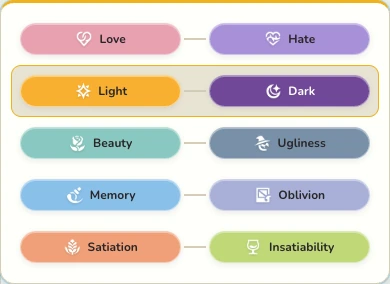
The opposing-Aspect selector shows each available pair.
Open these resultsLeave unpaired Aspects unpaired
Try one pair in a roster
The Light/Dark starter team places one Dark Anima and one Light Anima in the team builder. Replace either creature and watch whether the pair line stays complete. A complete line still only describes the selection. Starting teams you can change has larger named rosters that cover a whole pair.